Flight Guidelines

Flight Guidelines for Drone Based Thermal Mapping in Solar Power Plants
Pre Flight Preparation Guide for Professional Thermal Inspection

This documentation is prepared to guide the planning and execution of flights performed with DJI drones, ensuring that inspections are carried out in accordance with operational instructions. It serves as a comprehensive guide to help you use the MapperX software efficiently and effectively.

Download as PDF

DJI Flight Guidelines Image

Environmental Factors

For mapping flights, it is ideal to fly the drone during midday hours when the sun is at its highest point.
During this period, light conditions are optimal, enhancing the clarity of the images.
In addition, windless and cloudless days should be preferred to ensure the drone remains stable and image quality is not adversely affected.

ucus yonergeleri 2
Irradiance
Above 600 Watt/m²
ucus yonergeleri 3
Wind
Below 25 km/h
ucus yonergeleri 4
Temperature
Between 0 C and 50 C
ucus yonergeleri 5
Cloudiness
Below 2 Oktas
ucus yonergeleri 6
Shooting Time
3 hours after sunrise
3 hours before sunset

Flight Information for Tracker Based Solar Plants

Before planning a flight in solar power plants with tracker systems, the current position of the panel angles must be checked. When necessary, the tracker system should be optionally set to a fixed position and kept stationary throughout the flight.

When creating flight missions, the plant should not be evaluated as a single unit. Each transformer zone should be divided into separate flight plans and mapped individually. This approach increases data integrity and significantly enhances flight safety.

Flight Settings

ucus yonergeleri 7

Drone Model Selection

Make sure you have selected the correct drone and always choose the Wide and IR lenses in the Lens Selection section.
ucus yonergeleri 8

Ground Sampling Distance (GSD)

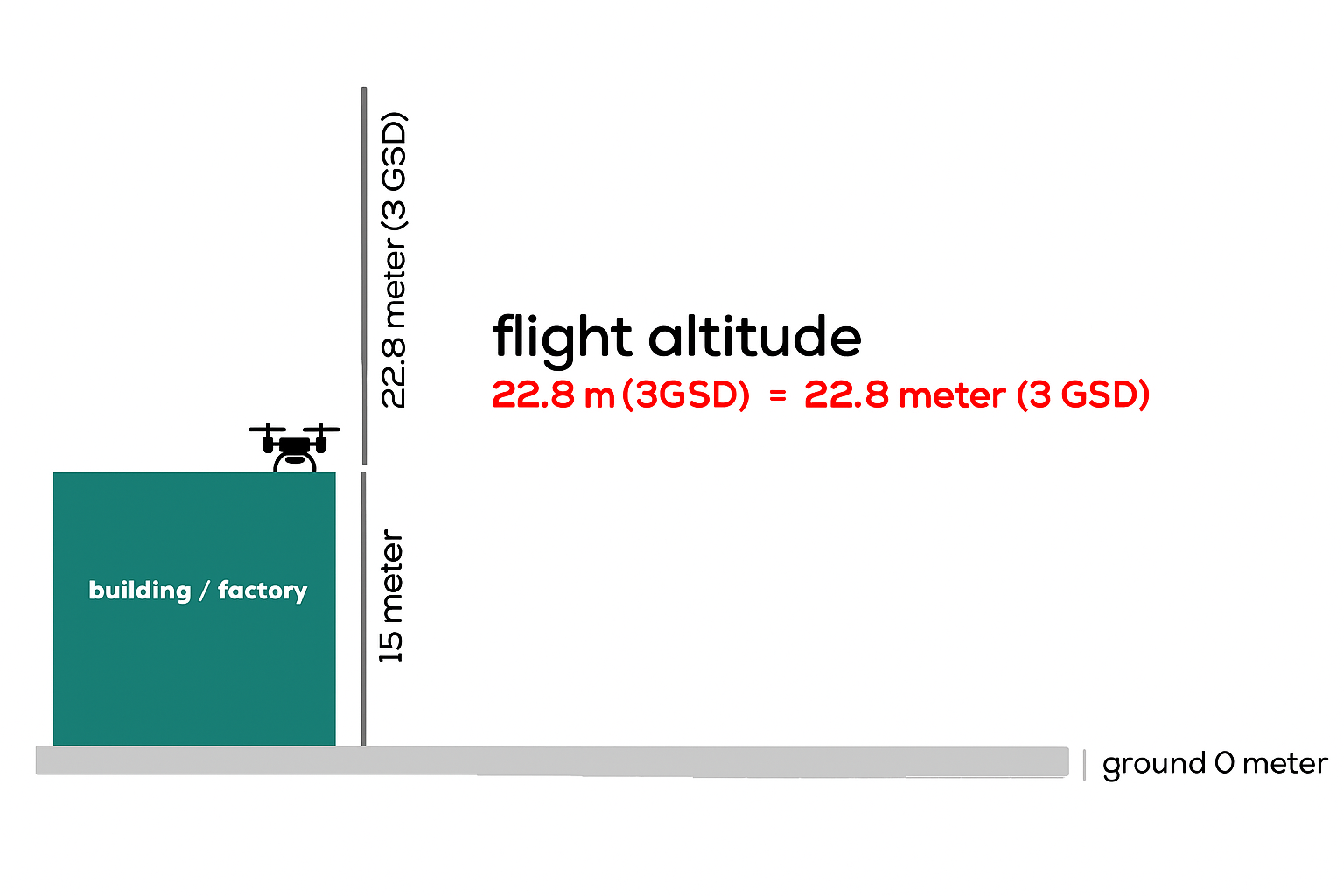
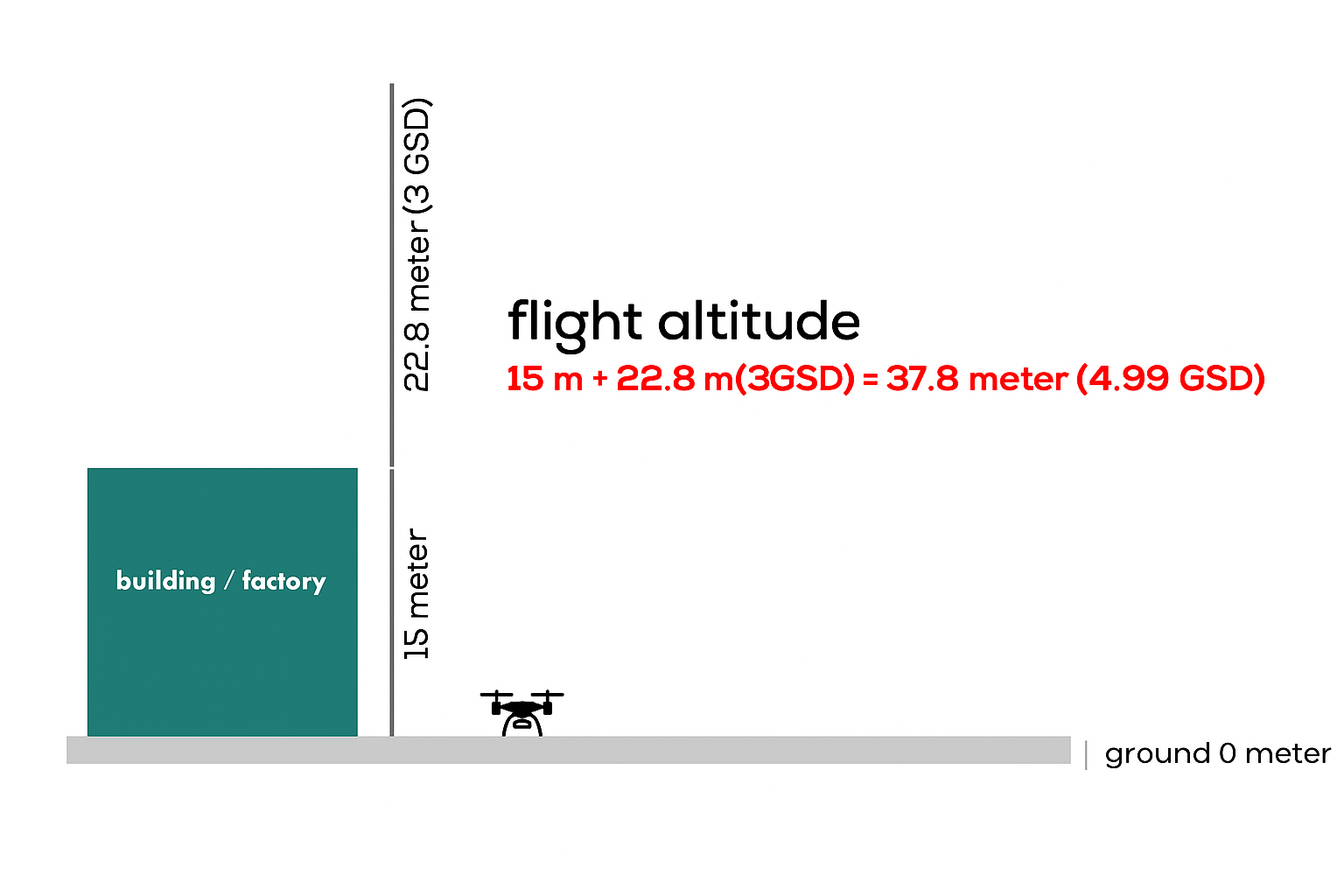
Depending on your reporting preference, the Professional Package uses a 5 cm GSD, while the Enterprise Package uses a 3 cm GSD. This allows you to perform analyses at different levels of detail according to your needs. In rooftop solar power plants, if the flight is conducted from ground level instead of directly above the roof, the roof height must be calculated and added to the total flight altitude.
ucus yonergeleri 9

Altitude Mode

ALT (Altitude Relative to Takeoff Point): Can be used if the slope of the plant area is less than 5%. The drone maintains a constant altitude relative to the takeoff point. AGL (Altitude Relative to Ground Level): Preferred for uneven or sloped terrains. To use this mode, you can either upload the DSM file generated from an RGB orthophoto with 10 cm GSD to the controller via MicroSD card or download the required elevation data using the "Download from Internet" option.
ucus yonergeleri 10

Speed

To obtain accurate mapping data, it is recommended to fly at no more than 50% of the maximum speed suggested by the controller.
ucus yonergeleri 11

Orientation Angle

The plant’s map view should be examined from the controller, and flights should be conducted perpendicular to the strings (rows). For solar power plants in Turkey, an orientation angle of 180° is generally suitable; however, adjusting the angle according to the specific site location will yield more accurate results.
ucus yonergeleri 12

Overlap Ratio

To ensure data accuracy during flight, the following overlap ratios and tolerance value should be used: Side Overlap Ratio: 70% Front Overlap Ratio: 80% Tolerance: 5.00
ucus yonergeleri 13

Photo Mode

Always select the Interval Shooting Distance mode.

Camera Settings

ucus yonergeleri 14 e1763110837695

Color Palette Selection

After switching to the camera view, switch to thermal mode and select the WhiteHot option from the color palette settings located in the upper-right corner. The custom settings in the color palette selection screen should be left at their default values.
ucus yonergeleri 15

Mode (Temperature)

In the thermal camera view, the Mode value displayed on the screen should always be set between -20 and 150.
ucus yonergeleri 16

Thermal Camera Calibration

After setting the color palette and mode, position the camera facing the solar panels before the flight and press the FFC button in the upper-right corner once to calibrate the camera.
ucus yonergeleri 14 e1763110837695

Color Palette Selection

After switching to the camera view, switch to thermal mode and select the WhiteHot option from the color palette settings located in the upper-right corner. The custom settings in the color palette selection screen should be left at their default values.
ucus yonergeleri 15

Mode Temperature

In the thermal camera view, the Mode value displayed on the screen should always be set between -20 and 150.
ucus yonergeleri 16

Thermal Camera Calibration

After setting the color palette and mode, position the camera facing the solar panels before the flight and press the FFC button in the upper-right corner once to calibrate the camera.

RTK Settings

ucus yonergeleri 17

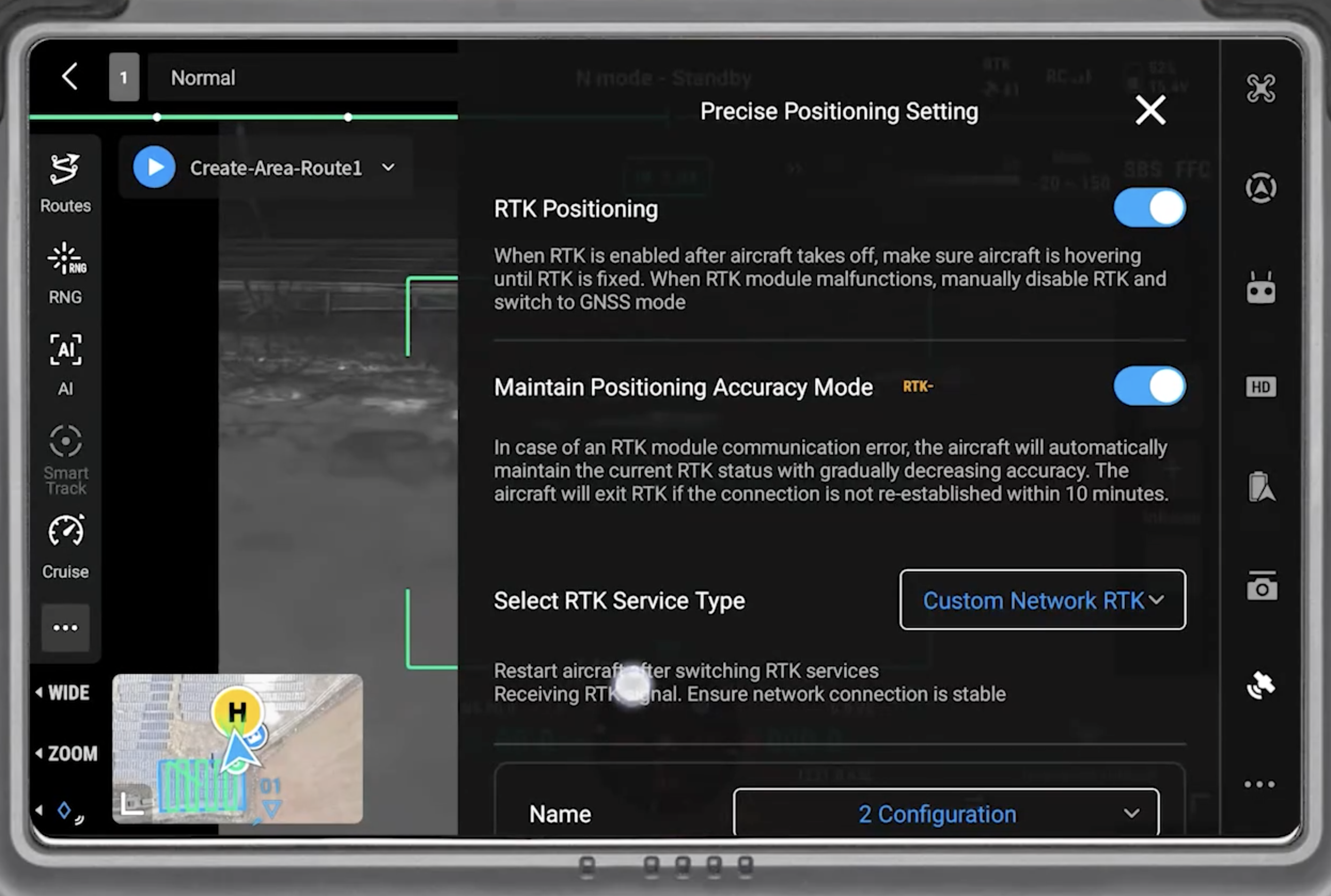
RTK Positioning

Before the flight, enable the RTK Positioning and Maintain Positioning Accuracy Mode options in the Precision Positioning Settings menu. From the Select RTK Service Type menu, choose Custom Network RTK, and in the configuration section that appears below, enter and save the address information of your local fixed GNSS network if you have a subscription. If you are using a GNSS device, enter and save the address information of your GNSS unit.
ucus yonergeleri 18

RTK Connection Status

The RTK connection status should be monitored under the Status menu and must show as FIX. The numbers of GPS, Beidou, Glonass, and Galileo satellites should be visible below. A higher total number of satellites will improve mapping accuracy.
ucus yonergeleri 17

RTK Positioning

Before the flight, enable the RTK Positioning and Maintain Positioning Accuracy Mode options in the Precision Positioning Settings menu. From the Select RTK Service Type menu, choose Custom Network RTK, and in the configuration section that appears below, enter and save the address information of your local fixed GNSS network if you have a subscription. If you are using a GNSS device, enter and save the address information of your GNSS unit.
ucus yonergeleri 18

RTK Connection Status

The RTK connection status should be monitored under the Status menu and must show as FIX. The numbers of GPS, Beidou, Glonass, and Galileo satellites should be visible below. A higher total number of satellites will improve mapping accuracy.

Accessory Requirements

ucus yonergeleri 19

Memory Card Selection

To ensure your photos are written accurately and completely to the memory card, the minimum write speed must be 120 MB/s. MapperX recommends using a card with a write speed between 150 MB/s and 160 MB/s.
ucus yonergeleri 20

GNSS Receiver

RTK (Real-Time Kinematic) technology uses GNSS signals to provide centimeter-level accuracy. Therefore, for maps requiring precise positioning, the use of a GNSS device is mandatory to ensure a stable RTK connection and minimize signal loss.

Important Considerations for Rooftop Power Plants

yonerge 2 1
Plan A
yonerge
Plan B
Try it Free for 3 Days

Start the Demo Now

Instantly explore a real solar power plant inspection, freely navigate within the platform, and discover our innovative features such as AI-powered analysis, autonomous reporting, and panel-based anomaly detection.

Frequently Asked Questions

1. What is thermographic inspection in solar power plants?

Thermographic inspection is a technique used to detect the temperatures of equipment in solar power plants. This inspection allows for early detection of potential faults and preventive maintenance.

2. Why is thermographic inspection important?

Thermographic inspection helps improve the efficiency of equipment in solar power plants. Early detection of faults and preventive maintenance can reduce operating costs.

3. How is thermographic inspection performed?

Thermographic inspection is performed using thermal cameras. The cameras detect the temperatures of the equipment, and this data is processed and reported by MapperX.

4. Does thermographic inspection damage the site?

Thermographic inspection is a non-destructive process and is applied without making any physical changes to your plant. It does not damage your site and helps maintain the safe operation of your plant.

5. Why is a thermal camera important?

Thermal cameras are used to accurately detect the temperatures of equipment in solar power plants. These cameras help with early detection of faults and preventive maintenance.

6. How is thermographic inspection reported?

Thermographic inspection data is processed by our software, and a comprehensive report is created. These reports are used to improve the efficiency of solar power plants and reduce operational costs.

The MapperX Help Center is a comprehensive documentation resource designed to make the MapperX platform easier to use and increase efficiency. It allows users to access the information they need quickly and effectively.

Help Center

Follow the steps of region selection, route creation and data collection for the drone flight planning process on the MapperX platform. If you encounter any problems, you can contact our technical support team.

Technical Support

Blog

You can find articles about the latest technology news, sectoral developments and global energy trends regarding solar energy systems.
Get solar energy tips and information about the future of solar systems from our industry experts.

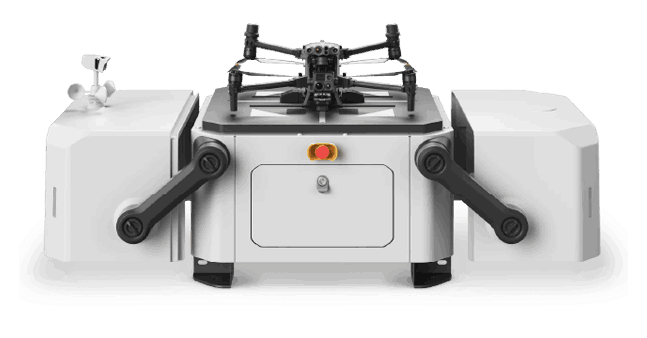
mapperx dji dock2 drone 1

Drone Pilot Network

Get quotes from MapperX approved pilots and expand your operations globally.

Partner Program

Build Strong Collaborations to Optimize Your Inspection Activity!

IEC IAF TÜRKAK ILAC-MRA

With our AI-powered software MapperX, we have automated thermographic inspection processes. Accredited under IEC 62446-3 as a Type A inspection body, our organization represents a first in the sector with this distinction.

mapperx logotpye white 1

MapperX is an AI-driven analysis and reporting software that enhances the efficiency of solar power plants while reducing carbon emissions. By digitalizing maintenance and repair processes, it increases operational efficiency, minimizes financial losses, and prevents fire risks.

Analysis, Management and Reporting Platform in Solar Power Plants.

© MapperX - All Rights Reserved.